Setting up WordPress on AWS

As a part of my move to AWS, I wanted to continue using WordPress for my CMS, as it is so simple to set up and yet highly configurable. Amazon makes this pretty easy using LightSail, and kicking off a bitnami WordPress package. That gets you set up with an instance of WordPress that you have total control over, and can customize to your heart’s content.


The next step is getting a domain name mapped to your site, so you need to use the Networking tab to set up a static IP, that you then use the DSN service to map to for proper name resolution. Now, you have a site addressable by a friendly name, hosted on a lighting fast platform you have total control over! 


So, that is where things took a turn for the worse. I wanted to get SSL & Email service up and running, so I started poking around a bit on options. The SSL portion seemed straightforward enough if I wanted to set up a load balancer, tie it into my LightSail instance and use Amazon for the cert. That was a non started for a couple of reasons, but one of those reasons was that a basic load balance starts at 18$ a month, and I am trying to build a re-usable pattern that will reduce my overall costs while improving performance across multiple sites / domains.


I turned to an open source Cert authority, called “Let’s Encrypt”. They offer 90 day duration certs that you can tie into your Bitnami instance using the SSH terminal access provided through AWS, to setup the Apache cert mapping on the Linux VPC. After some non trivial fiddling (I am clearly a little rusty on my linux command line over ssh) I got it working like a champ, with a cron job to refresh the certs periodically.


Looking into email was another challenge, as the documentation flat out said AWS was a bad choice for that, and so I was pushed outside. I have my existing provider account, so I mapped my MX records to point back to that provider, and forwarded from them to my Gmail, so I can keep using one stop shopping for my email. The whole config works like a charm with only a few seconds total latency in transport, so I will use it as is. 


The final output of this days work is a WordPress based site, hosted on AWS with an SSL cert from an open source provider, and integrated domain based email. I am now able to re-use this pattern to pull my other sites over to AWS and I think I will see a considerable savings while also making significant gains in performance!


Multi-Cloud Service Delivery

As I have been exploring the maturing environment of cloud services, I am regularly struck by the richness of the environments and the dramatic shift to “getting it done” with microservices, versus the legacy thinking of stack based development. There is much to dig into from an interoperability, scaling, global security model and more, but at present, the top three players in the space are offering a broad array of options that are sparking my thinking across a range of options and need spaces. 


  1.  AWS (Amazon Web Services)
  2. AZURE(Microsoft Cloud Services)
  3. Google Cloud Functions


The next level of maturity is an established pattern for integration, that uses global security models to facilitate interop, with a common set of controls that sit on top and are referenced across all platforms and data stacks. Getting to the granular, element level in the data lake, secured by role and user is critical in the emerging privacy world. There is a clear need to have the capability to have a single world view of a person, or a resource across these platforms, abstracting the security model in a scalable way for both development and user engagement. 


I am seeing articles pointing to this general thinking, but still not satisfied with a common “glue” or abstraction layer for these unified visions. I look forward to seeing this emerge, and being a part of that solution to the extent I am able.


Multi-Cloud – End Point Interop

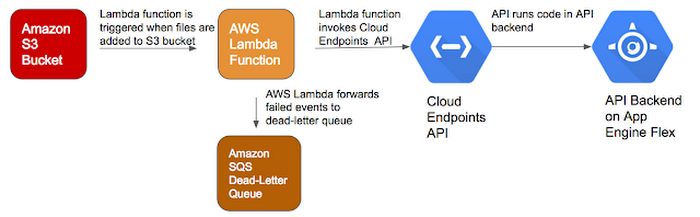
I wrote a previous post about moving back into development (at least on the edges) and part of that is exploring the best play for cloud compute.  One of the articles I came across was this one from the Google Cloud Platform


Opening Quote from the article: 

A multi-cloud strategy can help organizations leverage strengths of different cloud providers and spread critical workloads. For example, maybe you have an existing application on AWS but want to use Google’s powerful APIs for VisionCloud Video Intelligence and Data Loss Prevention, or its big data and machine learning capabilities to analyze and derive insights from your data.

https://cloud.google.com/blog/products/gcp/going-multi-cloud-with-google-cloud-endpoints-and-aws-lambda


applications-between-gcp-awsc82r.PNG


While I cannot claim much experience with the Google cloud offering, I can say I am enthused by this idea and approach. This represents so much to me, but one of the most significant is a changing of the guard that the current era of interop represents. I mentioned in prior posts that I started in the technical journey back in the earlier days (let’s leave it at that) and the platform religion was strong. What we see clearly in this article is a recognition that we are now in a world where we have increasing platform independence and are more free to focus on solution, and the best each has to offer – exciting times indeed.


Transition to AWS

I wiped out my prior sites and made a move to Amazon Web Services (AWS), consolidating hosting from GoDaddy, custom hosted WordPress, and also the commercial WordPress platform. The shift was surprisingly easy for most of my content and services, though shifting my email fully over is still in progress. 


The first thing I noticed was the speed of service – the difference in being directly on the AWS platform vs the other hosting I had is exceptional, and well worth the time to move. Ping tests dropped from multiple seconds to sub 1 second across the board. The costs overall have dropped and the available services are certainly improved, though I now need to manage a bit more. The management is well worth the effort, as AWS makes it as frictionless as possible in most cases.


The interfaces and available services are well documented, and the controls clear. My main question is why I waited so long! We have moved to primarily AWS based infrastructure for work, but making the same move at home has been too long in coming. Next project is to start building on the micro services platform, to see what I can do there. We have already been working with these capabilities in our Research areas at Celgene, with our internal team building “serverless solutions” using these micro services.